01
Browse naturally
Home, search, watchlist, playlists, collections, and large libraries—all designed for controller rays or hands.
The headset-first way to browse, watch, and step inside your Plex library. Fast on the Dashboard, expansive in Room, and designed to keep the picture pristine.
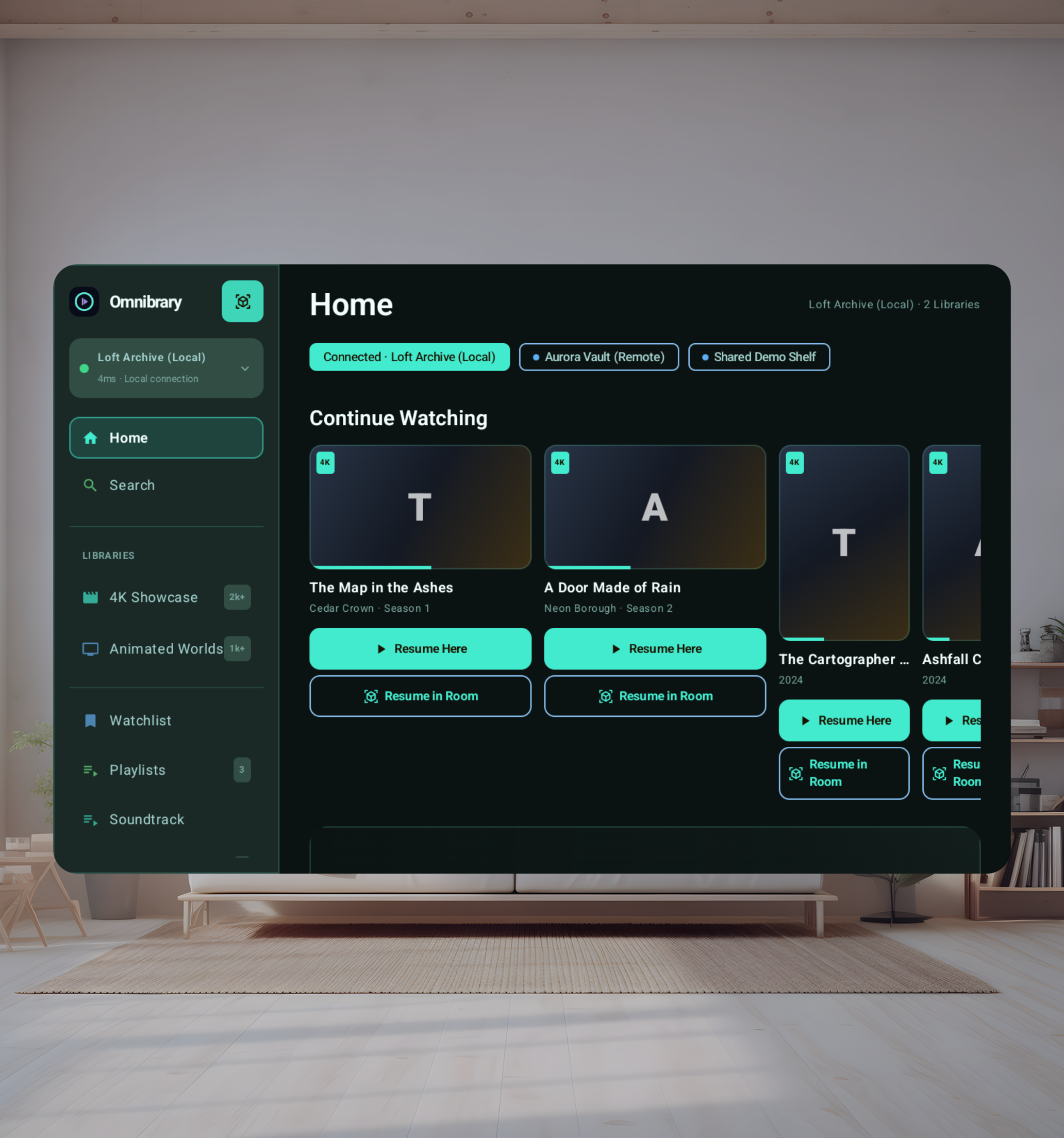
Omnibrary starts with what matters: finding the right thing quickly. Browse complete libraries, jump back into Continue Watching, or search across your server with your current server or all available servers.
Home, search, watchlist, playlists, collections, and large libraries—all designed for controller rays or hands.
Omnibrary direct-plays when the headset can handle it, then asks Plex for a compatible stream when it cannot.
Carry the same queue, position, tracks, captions, and playback speed into a screen shaped for your space.
Open a category to see the browsing, playback, and Room controls available in Omnibrary.
Find everything
Connect without entering your Plex password in the app.
Switch full, managed, guest, and PIN-protected users.
Discover owned and shared servers and remember the last reachable one.
Continue Watching, Recently Added, and server-curated rows.
Page smoothly through large movie, show, and mixed libraries.
Search your current server or all available servers, with results kept visible while the search updates.
Browse the full account Watchlist and change membership locally.
Plex playlists, collections, and private on-headset playlists.
Return to the right row and item after details, playback, or sleep.
Sort whole libraries and safely scan sparse quality filters.
Browse completed downloads when Wi-Fi or the server is unavailable.
See Plex artwork, summaries, year, runtime, progress, resolution, HDR, and audio badges.
See progress and mark movies, shows, seasons, or episodes watched or unwatched.
Move through show, season, and episode details one clear level at a time.
Browse fictional libraries and explore the Room without linking an account. Demo titles do not include playable videos.
Watch it your way
Use the original file when Quest advertises a compatible decoder.
Move to Plex HLS when the source or Room surface is incompatible.
Choose Original or remembered compatibility presets down to 480p.
Resume with one action, or start over from title details. Keep your place when moving into Room.
Advance playlists and season episodes, with a visible Up next state.
Play split media as one title with an aggregate resume position.
Jump with chapter data already embedded in Plex metadata.
Show Skip Intro, Credits, and Ads when Plex provides markers.
Keep preferred audio and subtitle selections across playback.
Adjust subtitle size, color, and vertical position for comfort.
Use playback speed, −10/+30, a large seek bar, and media keys.
Report play, pause, stop, seek, and watched state back to Plex.
Step inside
Transfer one live session without duplicate audio or a reset queue.
Keep decoded video free of controls, prompts, and decoration.
Move the large playback controls independently below the screen.
Place captions on their own movable strip outside the picture.
Choose a viewing preset, then adjust size, distance, or curvature. Games and advanced positioning have their own sections.
Remember your arrangement and restore a comfortable default anytime.
Select flat or equirectangular geometry live while in Room.
Choose mono, side-by-side, or over-under eye sampling.
Inspect, disable, add, remove, or restore projection aliases.
Browse live shelves and genre anchors in a seated-comfort arc.
Darken the Room without disturbing the active playback session.
Opt into a relaxed picture-safe target game beside the screen.
Made for a headset
Build a palette from a color wheel using real color relationships.
Use controller rays or supported hand input for browsing and playback controls.
Use large, distance-friendly controls instead of tiny TV chrome.
Close previews and walk metadata levels without exiting unexpectedly.
See clock, battery, playback mode, and connection type in-player.
Prefer local and direct paths before remote or Plex Relay.
Protect approved Plex sessions with Android Keystore and AES-GCM.
No ads, analytics SDK, or third-party crash-reporting SDK.
Create a reviewable, privacy-safe ZIP only when you choose.
Pause transfers on sleep and continue safely with byte ranges.
Stop slow playback transitions and reload only the useful scope.
Keep servers, downloads, playlists, and browse state with the right user.
Your library, not a sample shelf
Owned and shared servers, complete search, Plex Watchlist, playlists, collections, profile switching, and offline downloads live in one calm interface.
Picture first
Controls sit below. Captions get their own strip. Status, prompts, and errors stay off the picture.
Your space
Move it, curve it, resize it, recenter it, lock it, and save the layout right on your headset.
Flat, VR180 + VR360
Choose mono, side-by-side, or over-under playback with readable filename tags you control.
Invader Mode is an experimental, optional watch-along game that places relaxed targets beside the screen. It never covers the picture, touches playback state, or survives a room reset.
Your Plex session is encrypted on the headset. Omnibrary runs no advertising, analytics SDK, or third-party crash reporter. Privacy-safe diagnostics exist only when you deliberately export them.
Read the privacy policyNo media middlemanStreams move between your headset and Plex connections.
No automatic uploadsDiagnostics stay local until you choose to share them.
Profile-separated stateBrowse position and downloads remain scoped to the right user.
Built by Milky Turdle. Version 1 is being tested on Meta Quest 3 and is not publicly available yet. Quest 3S validation is still pending. Free, with all current features included. No subscription or in-app purchases. The official download will appear here after Meta review.
Optional experiments: Room, Describe search, Prepared 3D, Invader, Destroyer, and Game Deck/browser are marked Experimental. Each shows a notice before use, with a choice to continue or stay with regular viewing.